graph TD
    subgraph Strategic ["Level 1: Strategic"]
        A[Net Profit / ARR]
    end

    subgraph Tactical ["Level 2: Tactical"]
        B1[Customer Acquisition Cost]
        B2[Churn Rate]
        B3[Average Order Value]
    end

    subgraph Operational ["Level 3: Operational"]
        C1[Ad Spend / Clicks]
        C2[Support Ticket Vol]
        C3[Discount Usage]
        C4[Landing Page Conv %]
    end

    A --- B1
    A --- B2
    A --- B3

    B1 --- C1
    B1 --- C4
    B2 --- C2
    B3 --- C3

    style Strategic fill:#F8CECC,stroke:#333,stroke-width:2px
    style Tactical fill:#E1D5E7,stroke:#333,stroke-width:1px
    style Operational fill:#D5E8D4,stroke:#333,stroke-width:1px
Introduction
For a business intelligence specialist, it is important to remember that their real responsibility is not dashboards, charts, or even metrics, but decision quality.
A strong KPI system is the mechanism that connects strategy to execution through data. When KPIs are poorly designed, analytics turns into reporting theater. When they are designed well, analytics becomes a lever for business change.
In this article, I outline a seven-step KPI methodology from a practitioner’s perspective, grounded in real operational constraints.
These are the seven steps we follow:
- Create objectives.
- Describe results.
- Identify measures.
- Define thresholds.
- Model structure and data.
- Interpret results.
- Drive action.
This is not a rigid checklist. It describes a mature end state, though I often find that organizations operate in partial or iterative versions of this flow.
1. Create Objectives
This is where business intelligence analyst adds strategic value. The golden rule of KPI design I follow is simple:
No KPI should exist unless it supports a clearly defined business objective.
From a data perspective, we can treat objectives as filters. They limit what deserves to be measured and prevent metrics overgrowth.
I look for three things in a good objective:
- It explicitly supports business strategy.
- It is material enough to influence decisions.
- It can be influenced by the organization (rather than external noise).
This step may require pushing back if stakeholders request KPIs before objectives are articulated. I treat that as a signal to pause and reframe.
TipThe “so what?” test
If a stakeholder requests a KPI, I would ask: “If this number drops by 20% tomorrow, what specific meeting gets called?” If they can’t answer, we are looking at a metric, not a KPI.
2. Describe Results
In this step, we translate strategy into observable outcomes.
A common pitfall I see in KPI design is confusing activities with results.
“Launch a retention initiative” is an activity.
“Increase 90-day repeat purchase rate” is a result.
I aim to describe results in language that is:
- Outcome-oriented.
- Free of vague terms like optimized, improved, or efficient.
- Observable and interpretable in the real world.
For analytics specialists, this step is critical because ambiguous results lead to ambiguous measures. If we cannot clearly observe success, we cannot reliably model it.
3. Identify Measures
I believe a KPI should be expressible in one sentence containing countable entities. At this stage, I explicitly consider Lead vs. Lag vs. Diagnostic indicators.
| Category | Indicator | Metric Example | BI Value |
|---|---|---|---|
| Lag | Outcome | Annual Recurring Revenue (ARR) | Confirms what happened. |
| Lead | Predictive | Product Qualified Leads (PQLs) | Predicts future ARR. |
| Diagnostic | Root Cause | Feature Adoption Rate | Explains why PQLs dropped. |
Measure Quality
Candidate measures can be evaluated based on:
- Alignment with the objective.
- Business relevance.
- Data availability and reliability.
Ownership and Definition
I’ve found that every KPI requires three factors to survive:
- A business owner (accountable for outcomes).
- A data owner (responsible for logic and updates).
- A stable, explicit formula.
From a BI perspective, unclear ownership and changing definitions as bigger risks than imperfect data.
4. Define Thresholds
A KPI without a threshold is just a data point; a KPI with a threshold is a call to action. For an analyst, the challenge is defining “Normal” vs. “Critical” without relying on gut feeling.
Beyond Static Targets
Many organizations use “flat” thresholds (e.g., Red if Sales < $100k). However, businesses are rarely static. I prefer a more mature BI approach:
Historical Baselines
Comparing performance against a rolling average or the same period last year (YoY) to account for seasonality.
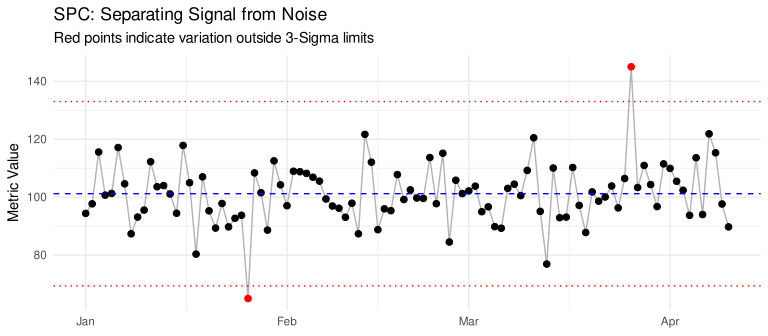
Statistical Process Control (SPC)
Using standard deviations of the mean to define “Natural Variation”. If a metric falls within 1..2 SD, it’s a noise. If it crosses the 3rd, it’s a signal.
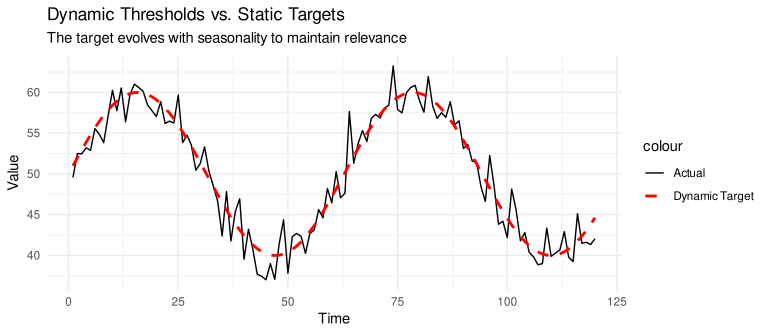
Dynamic Thresholds
Adjusting targets based on external variables (e.g., lower conversion targets during a known website migration).
RAG Model
The most common approach is the RAG model (Red, Amber, Green), where specific values are set to trigger a status change:
- Green: An acceptable result or on-target performance.
- Amber: A warning sign that requires investigation.
- Red: An unacceptable result requiring rectification.
| Status | Threshold Logic | BI Implementation | Business Action |
|---|---|---|---|
| Green | \(> 95\%\) of Target | Automated “Good News” report | Maintain current strategy |
| Amber | \(80\% - 95\%\) (Warning) | Trendline analysis & breakdown | Investigate root cause |
| Red | \(< 80\%\) (Critical) | Real-time Slack/Email alert | Immediate tactical intervention |
Normalization
When we have 50 different KPIs with different units, we cannot roll them up into a “Health Score” unless we normalize them.
By converting every KPI into a percentage of its target (\(Actual / Target\)), we can create a Weighted Health Index. This allows a CEO to see a single “Operations Score” mathematically derived from all of underlying metrics.
TipBenchmark traps
I would recommend avoiding industry benchmarks because they are averages of companies we aren’t competing with. I prefer thresholds derived from our specific unit economics and historical capability.
5. Model Structure and Data
This is where we see many KPI initiatives fail. Inexperienced teams build KPIs directly inside a visualization tool instead of building them into the data architecture.
Semantic Layer vs. Visualization Layer
To provide a Single Source of Truth, I decouple logic from the dashboard. Whether using dbt (Semantic Layer), Looker (LookML), or Power BI (Tabular Models), the goal is to define the metric once in code and reference it everywhere.
Key Architectural Requirements
- Granularity and Grain: We must define the lowest level of detail the KPI can be sliced by. If the grain is inconsistent across the model, our KPI aggregations will be wrong.
- History and Snapshots: I determine if our model needs to support point-in-time reporting versus just showing the current state.
- The KPI Hierarchy: I structure data to support a Drill-Down path:
- Level 1 (Executive): The North Star KPI (e.g., Total Revenue).
- Level 2 (Operational): The drivers (e.g., Average Order Value).
- Level 3 (Diagnostic): The raw attributes (e.g., Discount Code usage).
Technical Governance
We must ensure every KPI in the model is accompanied by:
- The SQL/Code definition: e.g.
SUM(net_revenue) / NULLIF(COUNT(DISTINCT user_id), 0). - Update Frequency: Clearly defined as real-time, hourly, or daily.
- Upstream Lineage: I map exactly which raw tables feed the KPI so I can perform impact analysis when a source system changes.
If your KPI logic lives in a hidden calculated field inside a specific dashboard, you haven’t built a framework; you’ve built a technical debt trap.
6. Interpret Results
Interpretation is where we move from being a “data provider” to a “business partner.” Most dashboards fail because they show the what but leave the why as an exercise for the reader.
Variance Analysis
To interpret results, there is a Variance Analysis. If Revenue is down, we check if it is because we sold fewer units (Volume Variance) or because we sold them at a lower price (Price/Mix Variance).
Three Pillars of Interpretation:
- Contextual Benchmarking: Never present a number in isolation.
- Bad: “Churn is 5%.”
- Good: “Churn is 5%, which is a 12% increase MoM, primarily driven by the Enterprise segment.”
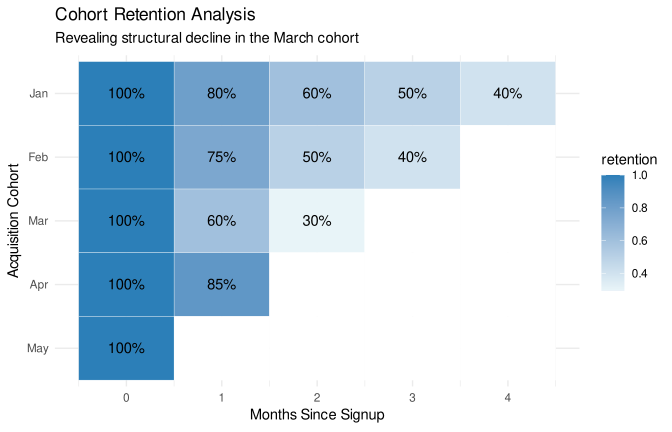
- Cohort Analysis: Aggregates lie. A KPI might look stable while a specific cohort is collapsing. Always look beneath the surface to see if a segment is skewing the average.
- Correlation vs. Causality: I use BI tools to overlay external events. Did the dip in “Engagement” happen exactly when the new UI was deployed? This helps us transform a correlation into a testable hypothesis.
Avoiding “Reporting Theater”
I’ve seen teams spend hours explaining tiny fluctuations. My solution is Exception Reporting: I build views that only highlight KPIs that have breached their thresholds (using XmR charts to distinguish noise from signals). This forces the conversation to stay focused on what actually requires attention.
TipAnalyst’s Note
My goal is to reduce the “Time to Insight.” If a stakeholder has to click five filters to understand why a KPI is red, my interpretation layer has failed.
7. Drive Action
The final stage is ensuring the data actually changes the trajectory of the business. I aim to move from Passive Monitoring to Active Orchestration.
Linking Metrics to Decision Rights
A KPI framework only works if there is an agreement on who acts when a threshold is breached. I facilitate this by embedding “Action Triggers” in our reporting:
- Remedial Actions: Short-term “fixes” (e.g., “If inventory falls below X, trigger a reorder”).
- Strategic Pivots: Long-term shifts (e.g., “If CAC stays above LTV for two quarters, we re-evaluate the channel mix”).
Tracking the “Action ROI”
I make it a point to measure the impact of the actions taken. We shouldn’t just report that a KPI went from Red to Green. I create analysis to track if the “Retention Initiative” actually caused the move, or if it was just seasonal noise.
Building the “Decision Log”
I am seeing more teams move toward “Decision Intelligence.” We keep a log of actions taken in response to KPI signals. Over time, this allows us to:
- Evaluate the effectiveness of past decisions.
- Onboard new leaders by showing them the “playbook”.
- Fine-tune thresholds based on whether past “Red” alerts actually required intervention.
TipAnalyst’s Note
Success isn’t measured by dashboard views, but by how many business decisions were influenced by the data.
KPI Definition Template
To put it all together, here is the template for documenting every core metric in a semantic layer. This ensures that the logic is transparent and the accountability is clear.
| Section | Field | Description / Example |
| 1. Strategic Context | Business Objective | e.g., Increase long-term customer value. |
| The “So What?” | If this drops 15%, we pause ad spend and audit the onboarding funnel. | |
| 2. Definition | KPI Name | e.g., 90-Day Repeat Purchase Rate |
| Indicator Type | Lead / Lag / Diagnostic | |
| Formula (Plain English) | (Customers with >1 order in 90 days) / (Total customers acquired in period) | |
| 3. Technical Logic | SQL / Code Snippet | COUNT(DISTINCT CASE WHEN order_count > 1...) |
| Data Grain | Daily by Region, Category, and Customer Segment. | |
| Update Frequency | Daily (T+1) | |
| 4. Thresholds | Green (Healthy) | Baseline + 5% (moving average) |
| Amber (Warning) | Within 2 Standard Deviations of Mean | |
| Red (Critical) | Outside 3 Standard Deviations (XmR Signal) | |
| 5. Governance | Business Owner | VP of Marketing (Accountable for the outcome) |
| Data Owner | BI Team / Aleksei (Responsible for logic integrity) | |
| 6. Interpretation | Common Variances | Is fluctuations driven by “Mix” (new vs. old users) or “Volume”? |
| Action Trigger | If Red: Notify CRM team to launch Win-back sequence. |
Download printable table: kpi-definition-template.pdf
Final Thoughts
KPI design is not a reporting task but a form of systems design. A strong framework creates alignment between strategy, data, and decisions.
See Also
Here are some of my other posts related to Business Intelligence, KPI design, and data visualization:




No matching items